
What DevboCMS Lets Our Clients Do That a Page Builder Never Will
Jump To Section
The problem with “good enough” websites
Page builders made the web easier. Click a template, drag a few blocks, change some colors, and you’ve got something online. For a while, that was a huge win.
But if you’re honest, a lot of those sites stop being helpful the moment your business grows up.
You start bumping into things like:
- “We want to showcase real case studies, not just a gallery of images.”
- “We need reviews, FAQs, and service areas updated all the time.”
- “We’d love a directory, or a calculator, or a widget—but our builder doesn’t really do that.”
- “We’re scared to touch anything because last time we ‘just edited a heading’ the whole layout exploded.”
At that point, the website isn’t a tool anymore. It’s a fragile brochure you’re afraid of.
DevboCMS exists for that moment.
It’s not “another builder.” It’s the control panel we put behind the custom sites we build—so the front end can be as premium as you want, while the back end stays simple enough that you don’t need a developer just to add a testimonial.
We still build the front end with the same framework used by Amazon, Apple, Nike, Tesla, and a ton of other big names (React), but we hide that complexity behind a clean dashboard so you never have to think about it. You just see fields that make sense for your business.
Let’s walk through what that actually means in real life, and why our clients don’t miss their old page builders for a second.
What page builders are good at (and where they start breaking)
To be fair, page builders do a few things well:
- They’re fast to start with when you have nothing.
- They come with a lot of pre‑built layouts and sections.
- You can move things around visually without touching code.
If your goal is a basic brochure site that almost never changes, and your business is essentially “one page of info plus a contact form,” a builder might be enough for a while.
Where things break is when your website needs to behave like part of the business, not just a static flyer:
- You want to store and manage real data: projects, locations, products, case studies, FAQs, reviews, content types that don’t fit neatly into “text + image block”.
- You care about speed and stability: every new plugin, widget, and visual tweak adds weight and risk.
- You want your team to edit content safely without the chance of dragging a section into oblivion or nuking a layout.
- You’d like to reuse content in smart ways—a case study that appears in a directory, on a portfolio page, and as a related item, without copying and pasting three times.
That’s exactly where we see builders hit their ceiling. They were designed primarily to arrange pages, not to model how a business actually works.
DevboCMS starts from the other side:“What does this business need to manage?”Then we build the website around that.
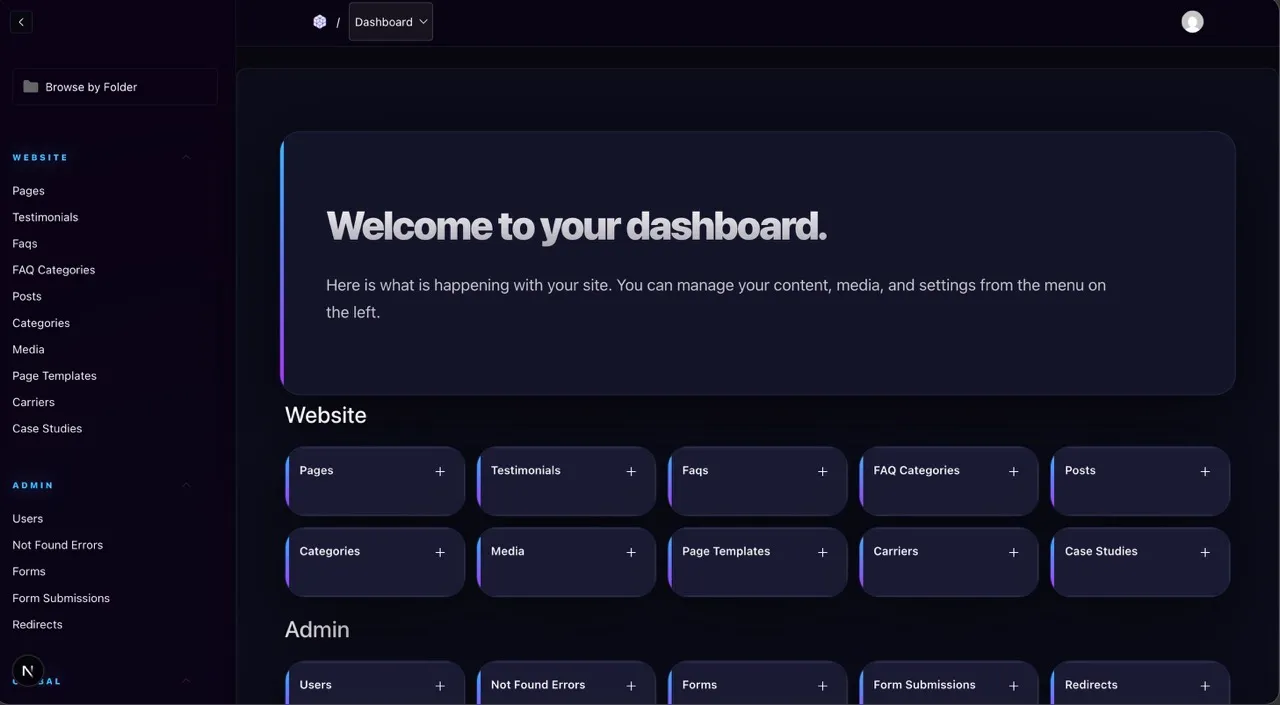
DevboCMS models your business, not just your pages
In DevboCMS, everything important becomes a collection.
If you can name it, we can turn it into something you manage cleanly in the dashboard:
- Portfolio projects
- Blog posts and educational guides
- Products and service packages
- Case studies and success stories
- Testimonials and reviews
- FAQs
- Locations / service areas
- Team members
- Resources, downloads, or tools
Each collection gets its own simple form with the exact fields you care about—nothing more, nothing less.
Instead of “edit this giant free‑form page and hope you don’t break the layout,” it’s:
- Click “Add Case Study”
- Fill in: title, client type, problem, solution, outcome, tags
- Upload images
- Hit save
The front end automatically displays it in the right place, with the right design, sorted and filtered correctly.
That’s something page builders struggle with. They’re great at building a page. They’re not built to manage 50, 100, or 700 entries of real‑world content in a consistent, structured way.
Edit safely without breaking anything
One of the most common things we hear from clients switching off builders:
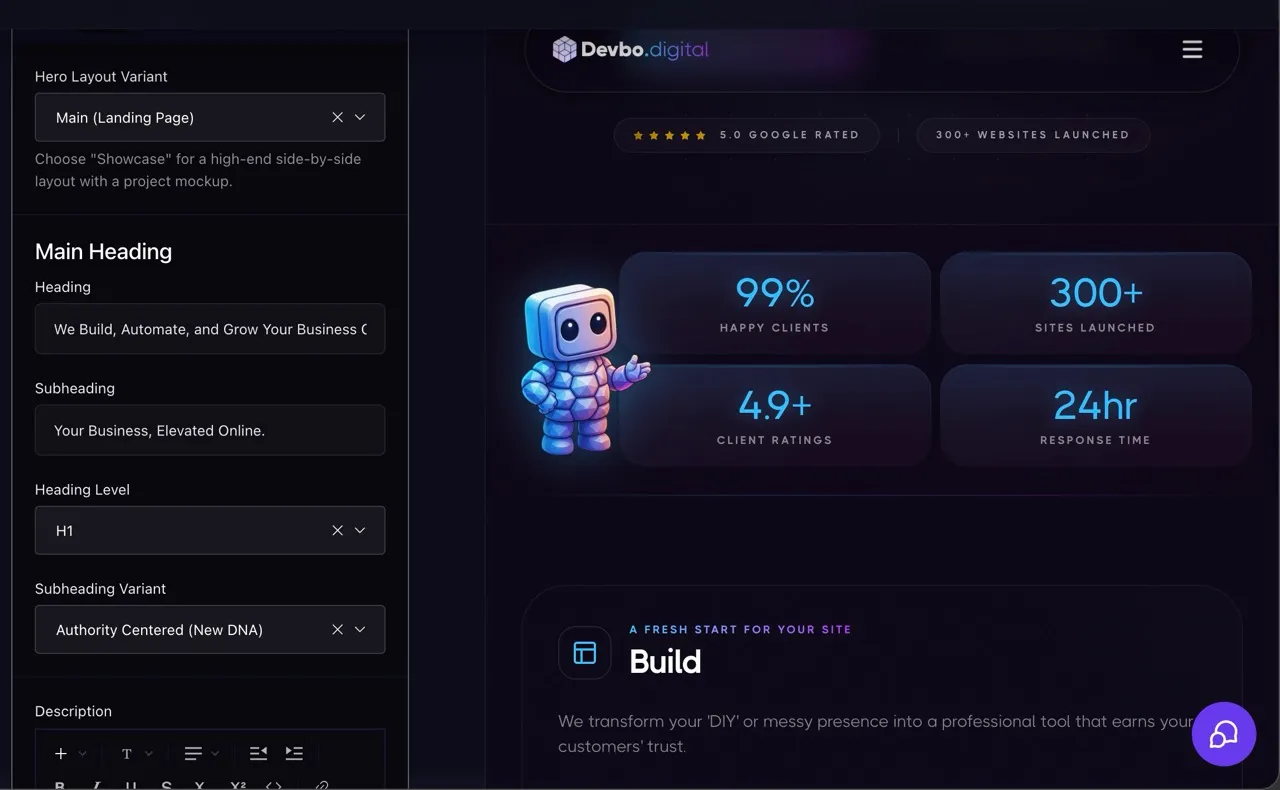
In DevboCMS, layout is locked in where it should be, and the parts you can change are clearly labeled.
You’re never dragging sections around on the live homepage. You’re filling in fields:
- Headline
- Sub‑headline
- Short intro paragraph
- Button label + link
- Image / gallery
We wire those fields into a custom front end that already knows how to display them beautifully.
You get control where it counts—words, images, content—without the constant fear that one wrong move will wreck your entire hero section.
Ship sites that are fast by design
Each new plugin or widget in a builder adds weight: more scripts, more CSS, more things to load and initialize.
Because DevboCMS sits behind a custom build instead of a generic theme, we don’t have to carry any of that. We only ship what your site actually needs.
The result is:
- Pages that feel instant on modern phones.
- A much easier time hitting that 90–100 PageSpeed score range.
- Fewer weird conflicts between “plugin A” and “plugin B.”
If your customers are bouncing because your site feels slow or clunky, all the fancy templates in the world won’t save you. A clean build plus a lean CMS will.
Bake in SEO and structure once—then forget it
Page builders often treat SEO like an afterthought: whatever plugin you install, that’s what you get.
With DevboCMS, we bake key pieces directly into the system:
- Meta fields on every collection item – title, description, and social share image so every page or post can be properly labeled; and it's all filled in for you without you touching anything.
- FAQ Schema – if you use FAQ accordions, we automatically output structured data so Google understands and can surface them. SEO agencies charge big money for this feature.
- Automatic sitemap generation – no need to baby‑sit a plugin; new content types can hook into the sitemap logic.
- Redirects and 404 tracking – if you rename or reorganize pages, you don’t lose the SEO value; we can route traffic cleanly.
You fill in the content; the system quietly does the boring housekeeping in the background.
Builders can do some of this with enough plugins and tinkering, but again—we’re building the structure once, in a way that matches your business, instead of duct‑taping features onto a generic theme.
Real examples: what DevboCMS lets clients do
To make this less abstract, here are a few real‑world setups we’ve either built or could easily build on DevboCMS—without the usual “I don’t think our page builder can handle that” conversation.
1. The auto appraiser with 700+ case studies
Imagine an auto appraiser who’s done hundreds of insurance disputes. Their work is insanely impressive, but all the proof is buried in emails, PDF reports, or mismatched blog posts.
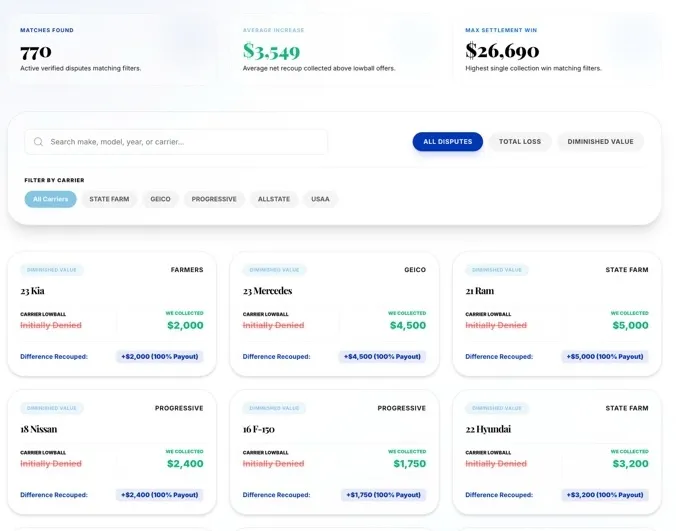
We model that in DevboCMS as a Case Study collection with fields like:
- Vehicle year, make, model
- Insurance carrier
- Dispute type
- Claim amount / settlement
- Short story of what happened
- Tags and outcomes
On the front end, we build a case study directory:
- Filter by carrier (“Show me all the State Farm wins”).
- Filter by dispute type (“Total loss”, “Diminished value”, etc.).
- Search by year/make/model (“2021 Tesla Model 3”).
When the appraiser wins a new case, they log into DevboCMS, add a new entry, and it automatically appears in the directory with the right filters.
Try doing that cleanly in a typical page builder without turning it into a maintenance nightmare.
2. The review widget powered by a simple admin
Most businesses want reviews on their site. The problem is:
- Copy/pasting screenshots ages badly.
- Embed codes from different platforms look inconsistent.
- Multi‑site businesses want the same review feed in several places.
In DevboCMS, we store reviews as a collection (or even pull them from a Google Sheet or API), then build a reusable review widget on the front end:
- It can be embedded on any page of their site.
- It can be embedded on partner sites, landing pages, or microsites.
- When a new review is added once in DevboCMS, every widget updates.
That’s the kind of “mini‑app” behavior that usually requires custom code and painful integration hacks in page builders. Here, it’s just part of the system.
3. The multi‑location service business that keeps adding offices
A growing service company starts with a single location. Then suddenly they have:
- Northside office
- Downtown office
- New city altogether
On a builder, this often turns into a mess of cloned pages and manually updated lists.
In DevboCMS, we create a Location collection with fields for address, phone, hours, map, and which services each location offers.
The site can then:
- Show a clean locations directory.
- Generate a detailed page for each office.
- Show “nearest location” blocks throughout the site.
- Keep everything in sync when they change a phone number or add a new branch.
The client never thinks about layout—they just manage the list of locations in the CMS.
4. The contractor who wants galleries, FAQs, and service areas under control
Another common setup: a contractor with:
- Multiple service categories,
- Lots of photos,
- A long list of FAQs,
- Several towns they serve.
In a page builder, this often becomes a pile of manually curated sections that go out of date the second something changes.
With DevboCMS:
- Services are a collection.
- Galleries are tied to services or projects.
- FAQs are categorized and can be shown wherever they’re relevant.
- Service areas are structured and re‑used across contact forms, landing pages, and schema.
Updating a service description, adding a new town, or uploading a finished project doesn’t require touching the layout at all.
When a page builder is still fine (and when it’s not)
We’re not going to pretend page builders have no place.
They’re still totally fine if:
- You’re spinning up a small personal website or temporary microsite.
- Your business doesn’t rely on the site for anything complex.
- You’re okay with slow-ish performance and occasional layout quirks.
But once your website is:
- A central way people decide whether they trust you,
- A place where you publish content regularly,
- A hub for case studies, products, locations, or tools,
- Or something you want to feel premium like the rest of your brand…
…then page builders go from “helpful shortcut” to “brick wall.”
DevboCMS is for the moment you realize you don’t just need a page—you need a system.
Why DevboCMS works so well for non‑technical teams
The funny part is: under the hood, the sites we build with DevboCMS are more advanced than most builder sites. We’re using the same kind of framework huge companies rely on, with a CMS tailored to each client instead of a one‑size‑fits‑all dashboard.
But what our clients feel is the opposite of “complex”:
- They log in and see words that match their business, not developer jargon.
- They have clear places to add things: a new case study, testimonial, post, location, product.
- They stop worrying about “breaking” the site.
- They get performance and SEO benefits automatically, without needing to know what’s happening behind the scenes.
That’s the whole point.
The technology stays out of the way so they can get back to running the business.
If your builder is starting to feel like a cage
If you’re bumping into the limits of your current builder—fighting slowness, hacking around missing features, or avoiding updates because you’re scared of breaking things—you’re not alone.
A lot of great businesses end up stuck on tools that were never designed for where they are now.
DevboCMS isn’t a magic button, and it’s not going to be the cheapest option on the menu. But it’s built for the businesses that are ready for their website to be:
- A real asset, not a fragile template.
- A system that holds content, reviews, locations, and tools together.
- A premium front end backed by a simple control panel that non‑tech people can actually use.
If you’re there—or you can feel yourself getting there—it might be time to move from “good enough” builder land to something built around you instead.
That’s what DevboCMS is for.
Stop Losing Leads to Outdated Tech
Your business is too good to look this outdated. We handle the heavy lifting, turning your website and systems into professional tools that actually work for you.
Start Your Upgrade
Free Website Audit
Enter your site URL to see your performance across SEO, authority, and UX.