
Get Indexed in 24 Hours with Google Indexing API: The Agency-Ready Guide
Jump To Section
TL;DR: Yes, you can get indexed in 24 hours with Google Indexing API—if your page qualifies (JobPosting or BroadcastEvent), your site is technically solid, and you understand the difference between fast crawl (minutes) and index decision (hours). For agencies, this means faster content live dates, better ranking velocity, and measurable SLAs for client work.
What the Google Indexing API Is (and Isn't)
The Google Indexing API lets site owners directly notify Google when specific pages are added or removed. According to Google's official documentation, it's designed for two use cases:
- JobPosting pages with proper JobPosting structured data
- Livestreaming event pages with BroadcastEvent embedded in a VideoObject
Critical reality check: The API is not for general blog posts, news articles, or service pages. Using it outside these guidelines can revoke your API access .
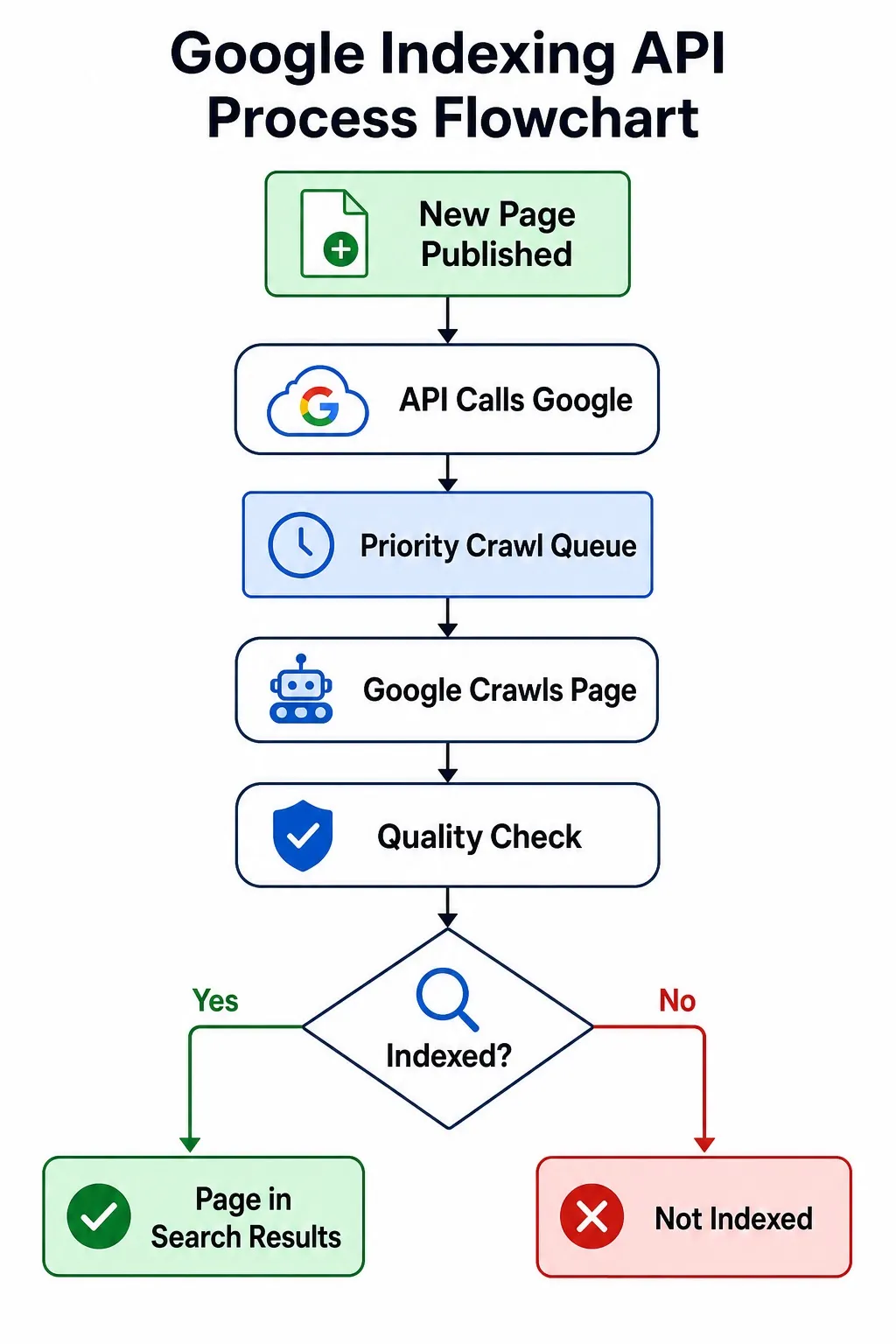
When you get a 200 OK response, it means Google received your notification—not that the page is guaranteed indexed. Crawl happens within minutes to hours, but the index decision varies based on Google's quality queue and your page's actual merit .
Timeline Reality: When 24 Hours Actually Works
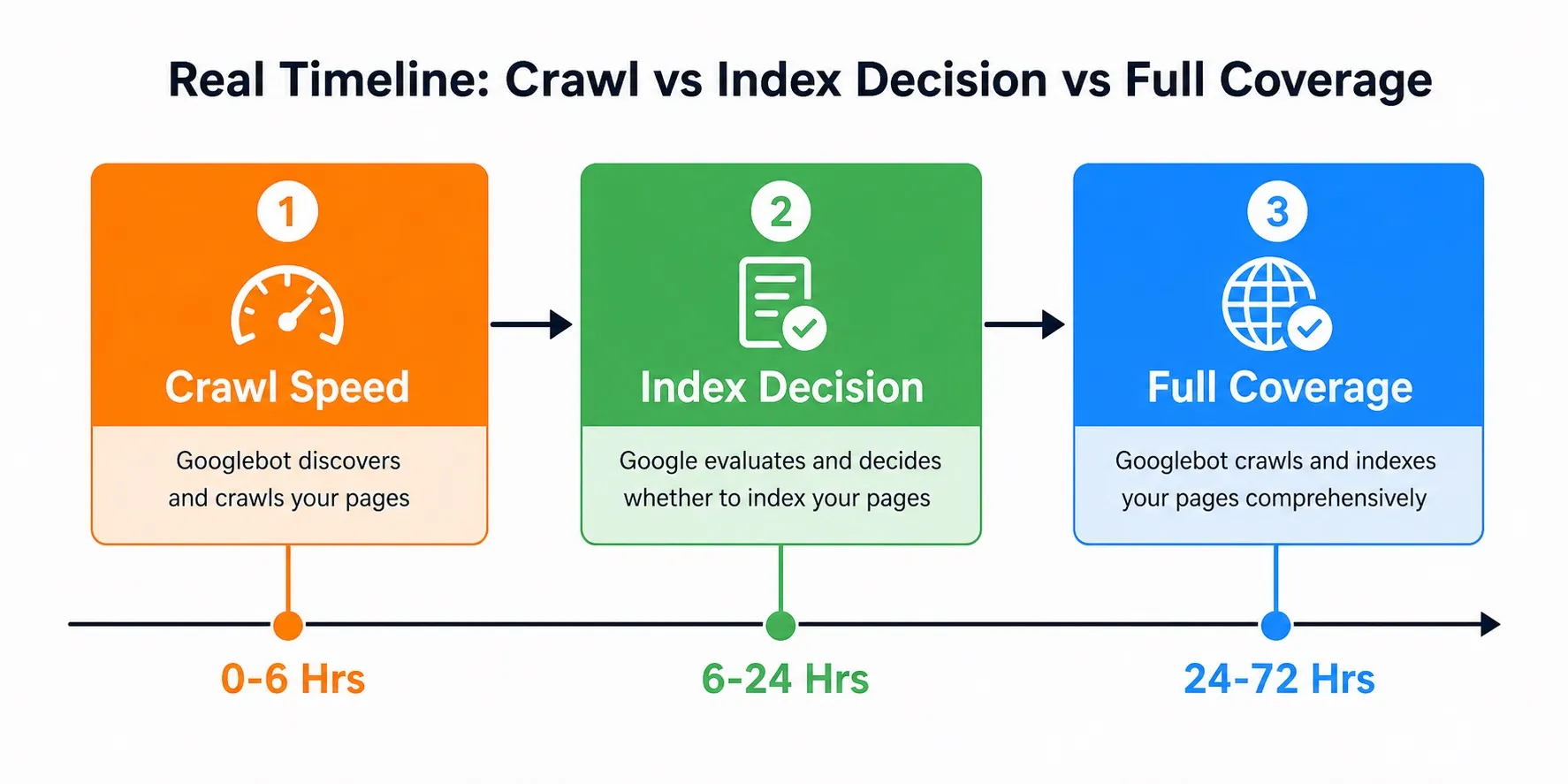
This is where most guides get it wrong. Here's what the data shows:
Phase | Time Range | What Happens |
Crawl Speed | 0–6 hours | Google fetches your page from priority queue |
Index Decision | 6–24 hours | Quality check + indexing decision |
Full Coverage | 24–72 hours | Page appears in coverage reports + search results |
When 24-hour indexing is realistic:
- ✅ Your page has JobPosting or BroadcastEvent structured data
- ✅ Site has strong technical SEO (fast Core Web Vitals, clean internal linking)
- ✅ Domain has established authority (not brand-new)
- ✅ You're within quota limits (default 200 requests/day)
When it fails:
- ❌ Blog posts, news articles, or generic service pages
- ❌ Poor technical foundation (slow load, broken links, bad mobile UX)
- ❌ New domains with no crawl history
- ❌ Spammy content or structured data violations
For standard indexing via Search Console's URL Inspection Tool, expect 2–10 days instead.
Speed alone is not enough. You still need content quality and structure, as covered in Devbo’s guide on how to create blog posts that rank in Google’s top 10
7-Step Setup: From Google Cloud to Bulk Submission
Step 1: Create a Google Cloud Project
- Go to Google Cloud Console
- Click New Project
- Name it (e.g., "Indexing API - Your Client Site")
- Select your organization and click Create
Step 2: Enable the Indexing API
- In your project dashboard, click APIs & Services → Library
- Search for "Web Search Indexing API (indexing.googleapis.com)"
- Click Enable
Step 3: Create a Service Account
- Navigate to APIs & Services → Credentials
- Click Create Credentials → Service Account
- Name it (e.g., "indexing-api-service")
- Click Create and Continue
- Skip role assignment (you'll add it later)
- Click Continue → Done
Step 4: Generate JSON Key
- Find your service account email and save it (you'll need this)
- Click the service account → Keys tab
- Click Add Key → Create new key
- Select JSON format
- Click Create
- The key downloads automatically—save it securely
Step 5: Add Service Account as Search Console Owner
- Go to Google Search Console
- Select your property (site)
- Click Settings → Users and Permissions
- Click Add User
- Enter the service account email
- Set role to Owner
- Click Add
Step 6: Test Your First Request
Use this Python snippet to test (replace placeholders):
from googleapiclient.discovery import build
credentials = service_account.Credentials.from_service_account_file(
'your-key.json',
scopes=
)
service = build('indexing', 'v3', credentials=credentials)
url = 'https://yourclient.com/job-posting-123'
service.urlMapping().notify(urlMapping={'url': url, 'type': 'URL_UPDATED'}).execute()
Expect 200 OK if setup is correct .
Step 7: Submit URLs in Bulk
You can submit up to 100 URLs per batch with the API. Default quota is 200 requests/day, but you can request increases .
For agencies managing multiple client sites, use batching to stay within limits while processing hundreds of URLs daily.
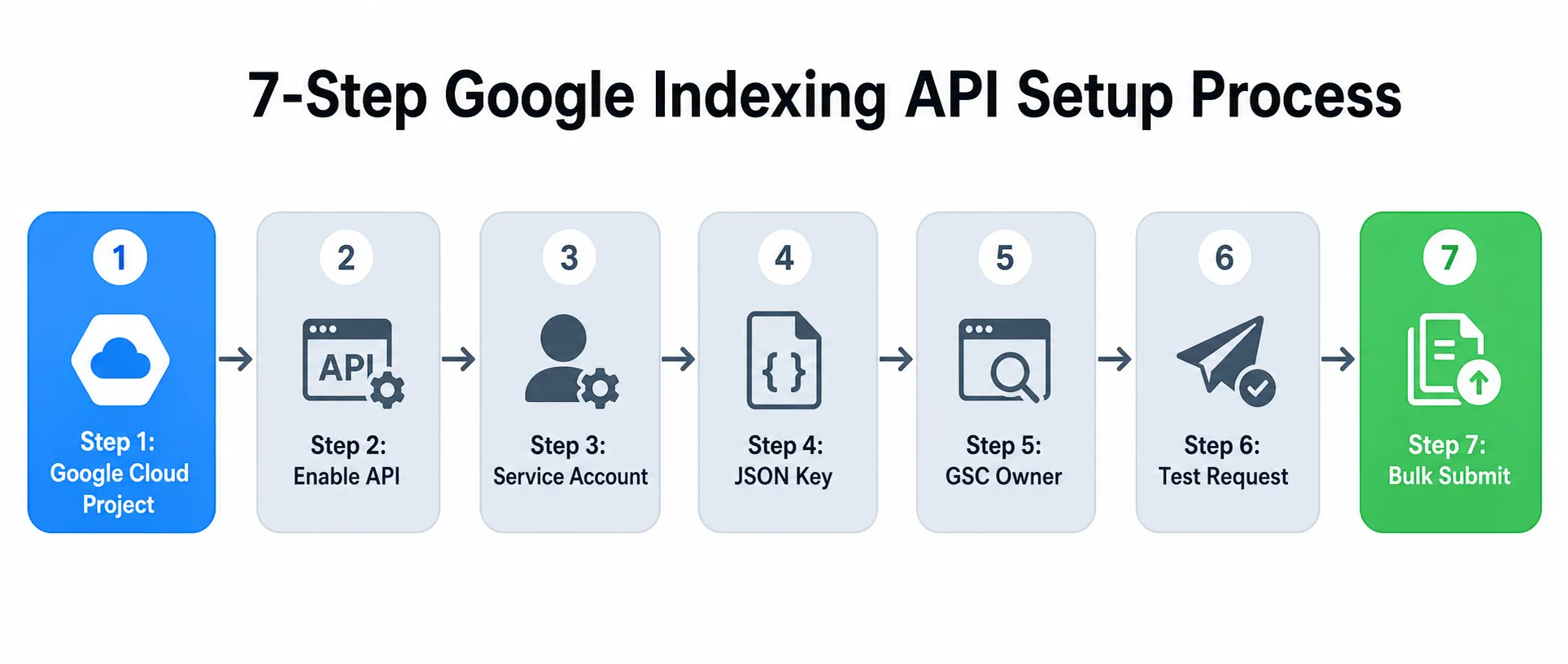
The API moves pages from publish → priority crawl queue → index decision → search results. Success isn't guaranteed, but speed improves dramatically.
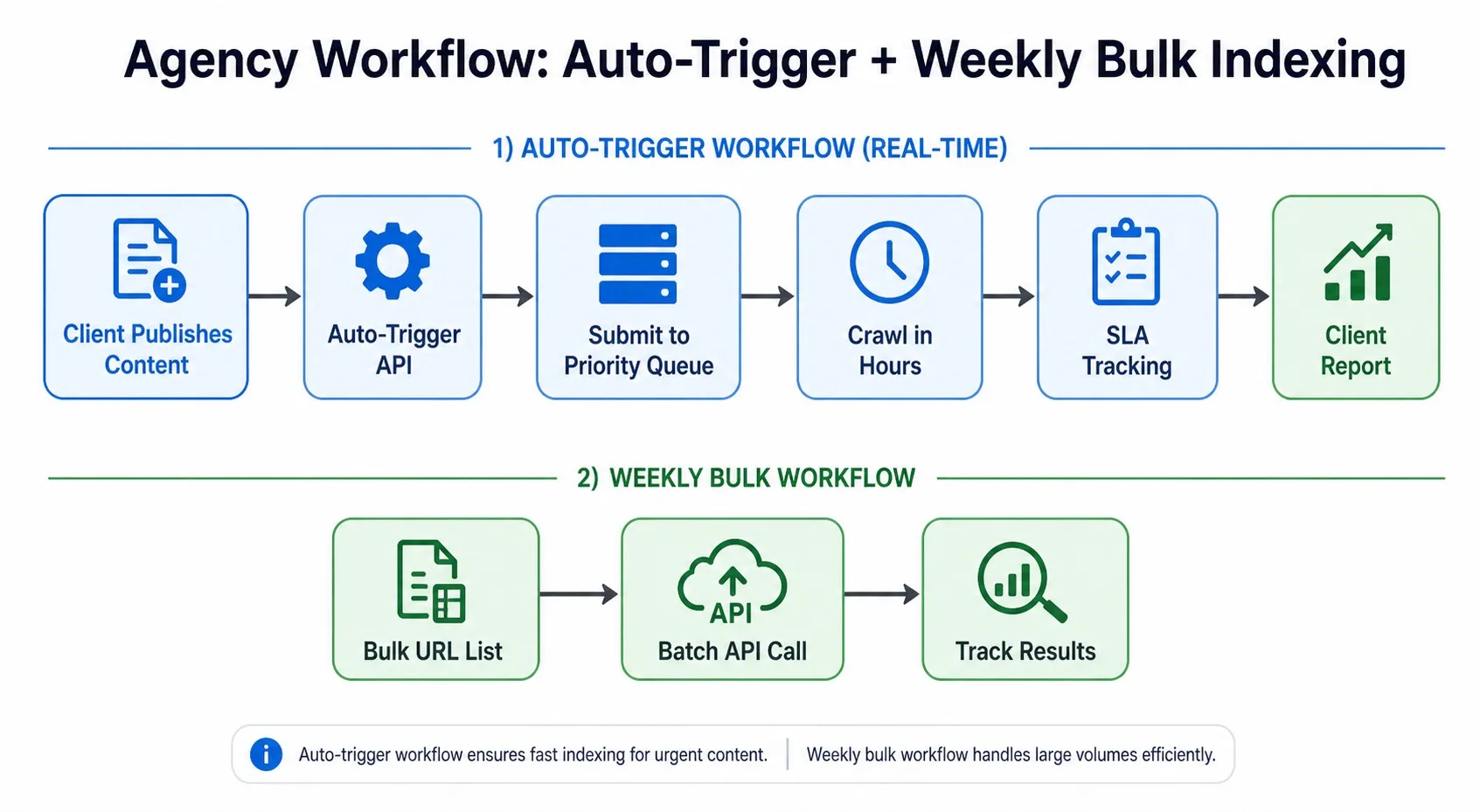
Agency Workflow: Auto-Trigger + Weekly Bulk Indexing
For agencies, the bigger win is operational. Instead of manually checking every page one by one, you can create a repeatable system for launch-day indexing, weekly batch reviews, and client reporting tied to your broader SEO services that turns indexing from a one-off task into part of a measurable technical SEO process.
For Devbo clients and web design agencies, here's the operations workflow that saves hours per client site:
Auto-Trigger on Publish (WordPress)
If your site runs on WordPress, pairing the API workflow with strong WordPress development gives you better control over publishing triggers, plugin configuration, and technical stability. This is especially useful for agencies managing frequent content updates or structured-content sites that need reliable publishing workflows.
Plugin options:
- Rank Math SEO + Instant Indexing API plugin
- SEOPress with built-in Google Indexing API support
Configuration:
- Install plugin and upload JSON key
- Set action to URL_UPDATED for new posts
- Configure auto-submit on publish
- Enable batching for multiple URLs
Weekly Bulk Indexing for Client Sites
For sites with many pages (e.g., job boards, product catalogs):
- Create Google Sheet with URL list
- Run batch API call (up to 100 URLs)
- Track results in GSC Coverage report
- Report to client with SLA metrics
SLA Tracking Dashboard
Metric | Target | Measurement |
Crawl latency | <6 hours | GSC Coverage → Last crawl |
Index decision | <24 hours | GSC Coverage → Indexed status |
Success rate | >90% | Successful 200 OK / Total requests |
Quota usage | <80% | Daily requests / 200 limit |
This workflow is ideal for agencies doing WordPress development and ongoing SEO management where content velocity matters .
Google Sheets Bulk Method: No-Code for Client Teams
For clients who aren't developers, Google Sheets + API is the safest bulk workflow:
Setup
- Create sheet with columns: URL, Type (URL_UPDATED or URL_DELETED)
- Use a simple script or tool like Request Indexing to submit
- Track results in a "Status" column
Benefits
- ✅ No coding required
- ✅ Easy for non-technical teams
- ✅ Visible audit trail for clients
- ✅ Supports up to 100 URLs per batch
This approach complements professional SEO services where you need transparent reporting .
Platform-Specific Notes
WordPress + Elementor
- Use Rank Math + Instant Indexing plugin
- Easy to edit without coding
- Auto-submit on publish works seamlessly
Wix / Squarespace
- Limited native API support
- Use third-party tools or manual batch submission
- Consider WordPress development for better API integration
Next.js / Gatsby (Headless CMS)
- Build custom API integration in your deployment pipeline
- Trigger on git push or CMS publish event
- Leverages DevboCMS infrastructure for secure, scalable indexing
Shopify
- Use Magefan Shopify app for setup
- Bulk submit via app interface
For eCommerce sites, Clearwater eCommerce Development with WooCommerce offers native API hooks .
Follow these steps in order. Skip steps 5 (GSC Owner) or 6 (Test) and you'll hit 403 errors.
Troubleshooting: Common Errors
403 Error: Permission Denied
Causes:
- Service account not added as GSC Owner
- JSON key corrupted or expired
- API not enabled in Cloud project
Fix:
- Re-add service account as Owner in GSC
- Regenerate JSON key
- Re-enable API in Cloud Library
429 Error: Quota Exceeded
Causes:
- Hit 200/day default limit
- Too many batch requests
Fix:
- Wait 24 hours for quota reset
- Request quota increase via Cloud Console
- Use weekly batching instead of daily
"200 OK but Not Indexed"
Causes:
- Page doesn't qualify (wrong structured data)
- Quality issues (thin content, spam signals)
- Canonical conflicts
Fix:
- Verify structured data with Google's Rich Results Test
- Run Test Live URL in GSC before requesting
- Check for canonical tags pointing to non-existent pages
Compliance Checklist: Don't Get Your API Access Revoked
Before using the Indexing API, verify:
- ✅ Page type: Only JobPosting or BroadcastEvent pages
- ✅ Structured data: Valid JobPosting or BroadcastEvent schema
- ✅ Quota guardrails: Stay under 80% of daily limit
- ✅ Content quality: No spam, thin content, or duplicate pages
- ✅ Technical setup: Fast Core Web Vitals, mobile-friendly, clean internal links
When to avoid the API:
- Blog posts (use Sitemap + GSC request instead)
- News articles (submit to Google News if eligible)
- Service pages (optimize for SEO first)
- New domains with no crawl history
For non-eligible pages, focus on SEO optimization including keyword research, on-page SEO, and local strategies to improve visibility naturally .
ROI for Agencies: Time Saved + Faster Rankings
Hours Saved Per Client Site
Task | Traditional | With API | Time Saved |
Manual GSC requests (100 pages) | 10 hours | 0.5 hours | 9.5 hours |
Weekly bulk indexing | 3 hours | 0.25 hours | 2.75 hours |
Tracking + reporting | 2 hours | 0.5 hours | 1.5 hours |
Total per month | 60 hours | 15 hours | 45 hours |
Business Impact
- Faster content live dates: Pages indexed in hours vs. weeks
- Ranking velocity: Get into top 10 faster when content is fresh
- Client SLAs: Measurable indexing timelines for contracts
- Competitive advantage: Beat competitors who wait for natural crawl
This efficiency is critical for agencies offering blog content creation and ongoing SEO where velocity matters .
FAQ: Google Indexing API
Can I use the API for blog posts or news?
No. Google explicitly states the API is for JobPosting and BroadcastEvent pages only. Using it for blogs can revoke access .
Does the API guarantee rankings?
No. The API only requests a crawl, not indexing. Google still evaluates quality, relevance, and user signals before ranking .
What's the daily quota?
Default is 200 requests/day. You can request increases via Google Cloud Console for larger sites .
What happens when I delete a URL?
Use URL_DELETED type. Google will remove it from the index faster than waiting for natural decay .
Why is my page not indexed after 200 OK?
Likely causes: wrong structured data, quality issues, or canonical conflicts. Check GSC Coverage report for details .
Ready to Accelerate Your Client Sites?
The Google Indexing API is the fastest tool for eligible pages—but it's just one piece of technical SEO. For complete visibility, you need:
- Technical Integrity: Fast Core Web Vitals, clean code, mobile optimization
- Contextual Content: Topic clusters that answer user pain points
- Digital Reputation: High-quality backlinks and E-E-A-T signals
At Devbo, we build websites with SEO best practices from day one, including Search Console registration and analytics setup. For ongoing velocity, our SEO services combine indexing automation with keyword research, on-page optimization, and local strategies .
Book a free discovery call to see how we accelerate content indexing for Florida businesses and beyond .
For agencies managing multiple client sites, auto-trigger on publish + weekly bulk batches = 45 hours saved per month.
Stop Losing Leads to Outdated Tech
Your business is too good to look this outdated. We handle the heavy lifting, turning your website and systems into professional tools that actually work for you.
Start Your Upgrade
Free Website Audit
Enter your site URL to see your performance across SEO, authority, and UX.